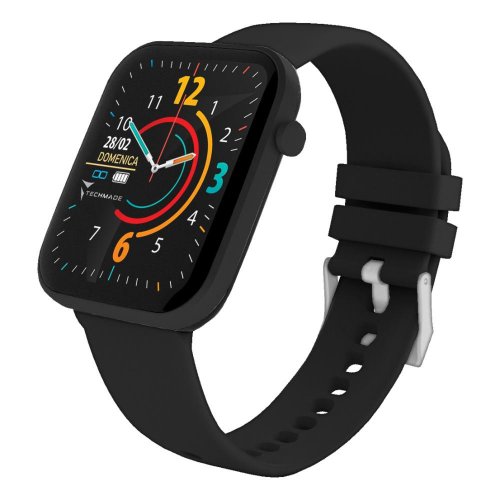
The Hava Smartwatch Total Black is the ideal companion for those who want advanced technology, comprehensive health monitoring, and connectivity always on their wrist, in an elegant and durable design.
Features
This smartwatch with an elegant and contemporary design, in a refined Total Black shade, was designed to offer a complete and intuitive user experience. Equipped with a large full-touch screen, it puts all the essential functions for your day right on your wrist. Its IP68 waterproof technology guarantees impeccable resistance to splashes and immersion, making it the ideal companion for every adventure.
Its cutting-edge technical specifications include:
- Realtek 8762DK CPU: for smooth and responsive performance.
- 1.69-inch full-touch colorful display: for clear viewing and intuitive interaction.
- BT 5.0 and G-Sensor technology: for seamless connectivity. Stable battery life and precise motion tracking.
- 220 mAh Li-polymer battery: for long-lasting battery life.
- IP68 Waterproof: for complete protection against water and dust.
- Extensive compatibility: with smartphones iOS 11.0 or higher and Android 6.0 or higher.
- Integrated functions: Call notification, notifications, Advanced Cardio Test (heart rate, saturation, and blood pressure), pedometer, calories, distance, stopwatch, Sleep Monitor, Wrist Sense, customizable wallpaper, menstrual history, Music remote control, and sleep mode. Sports.
Please note that the health monitoring features offered by this smartwatch are intended as wellness tools and cannot replace professional medical instruments. This product is not a medical device and should not be used for diagnosis or medical applications.
The user interface is designed for maximum simplicity:
- Swipe right: Access the main menu with features such as Steps, Sleep monitor, Heart rate, Sports, Blood pressure, SpO2, Weather, Notifications, Snapshot, Music player, Relax, Stopwatch, Alarm, Timer, Flashlight, and More.
- Swipe down: View the main menu to enable/disable/access Flashlight, Theater mode, Do not disturb, Brightness, and More. and Settings.
- Swipe left: See your daily data collected, including Steps, Distance, Calories, Heart Rate, Sleep Monitor, Blood Pressure, SpO2, and Weather.
- Swipe up: See your incoming notifications.
Explore the many features designed for your well-being and productivity:
- Sports: Choose from 7 preset sports to track your activities. Accurately track your physical activity.
- Heart Rate: Monitor your heart rate in real time.
- Relaxation: Practice guided breathing exercises to find calm.
- Alarm/Medication Reminder: Set custom reminders via the app.
- Weather: Receive automatically updated forecasts after connecting to the app.
- Music Player: Control your music directly from your wrist after connecting to the app.
- Other Functions: Includes a stopwatch, sedentary reminder, menstrual history, Wrist Sense, and a wide selection of customizable Watchfaces (3 presets, 1 editable, and many more downloadable via the app).
Tips of use
To ensure optimal performance, charge the device before first use. Charging is Simple and intuitive:
- Plug the USB port of the cable into a charger (5V 1A) or PC.
- Correctly position the magnetic connector on the back of the smartwatch.
- Use the charging cable only on a dry, flat, and stable surface.
- After charging, unplug the power supply (avoid leaving the device charging overnight).
- Use only the supplied cable to prevent damage.
- Unplug the cable during cleaning, thunderstorms, or extended periods of non-use.
- Do not attempt to disassemble, modify, twist, or pinch the charging cable.
- Do not attempt to remove or replace the battery; Dispose of the product correctly.
To unlock all the features of your smartwatch, it is essential to connect it to the dedicated app:
- Scan the QR code in the user manual to download the app.
- Open the app, set up your profile, and access the 'Device' section.
- Press the button to start scanning and select the correct device.
- Before connecting, make sure the battery is fully charged and your smartphone's Bluetooth is turned on.
- Verify that there are no previous active connections; If so, unpair them and re-pair exclusively via the app.
- Maintain an adequate distance between your smartphone and smartwatch to avoid interference.
- Some functions may vary depending on your smartphone model (Android/Apple).
Navigating between functions is intuitive:
- Swipe right to access the main menu.
- Swipe down to view the menu. General.
- Swipe left to view daily data.
- Swipe up to view notifications.
Using the main functions:
- Sports: Click on the screen to choose from the 7 preset sports. The workout will start automatically and can be be paused/resumed/terminated.
- Heart Rate: Starts measuring your heart rate.
- Relax: Follow guided breathing exercises.
- Alarm/Medicine Reminder: Add new alarms or reminders via the app.
- Weather: The forecast updates automatically after connecting to the app.
- Music Player: Control music playback after connecting to the app.
To keep your smartwatch in top condition, follow these simple cleaning instructions:
- Use a soft, dry cloth.
- Do not use alcohol or other harsh cleaning solutions.
- Do not attempt to dry the Do not expose the product to intense heat sources (microwave, oven, hair dryer).
- Unplug the charging cable before cleaning.
Important warnings for the safety and longevity of the device:
- This is not a medical device and should not be used for diagnosis or medical applications.
- Do not disassemble the device; For repairs, contact an authorized service center.
- Keep away from electrical appliances, shocks, impacts, vibrations, and heat sources.
- Do not handle the device with wet hands while charging.
- If immersed in salt water, rinse immediately with fresh water to prevent damage to metal components.
- Avoid charging near flammable materials.
- Take care of the charging socket/connector.
- Do not modify the product or the operating system.
- This product is not a toy; keep out of reach of children and pets.
- Handle gently, protecting it from impacts and drops.
Product Code:FRCM230919
Price Trend
This product has been on sale since 18/11/2025
In the last 30 days, the product's lowest price
was 59,25 €




 Richiedi info sul prodotto


